






Test changes with statistical significance
Experiments is one of the tools that makes your product self-driving: the evaluation that proves a change actually worked. Built to natively work with product analytics, session replay, feature flags, and surveys.
Install with AI in a single prompt
Paste into your terminal or code editor and make AI do the work.
What does it do?

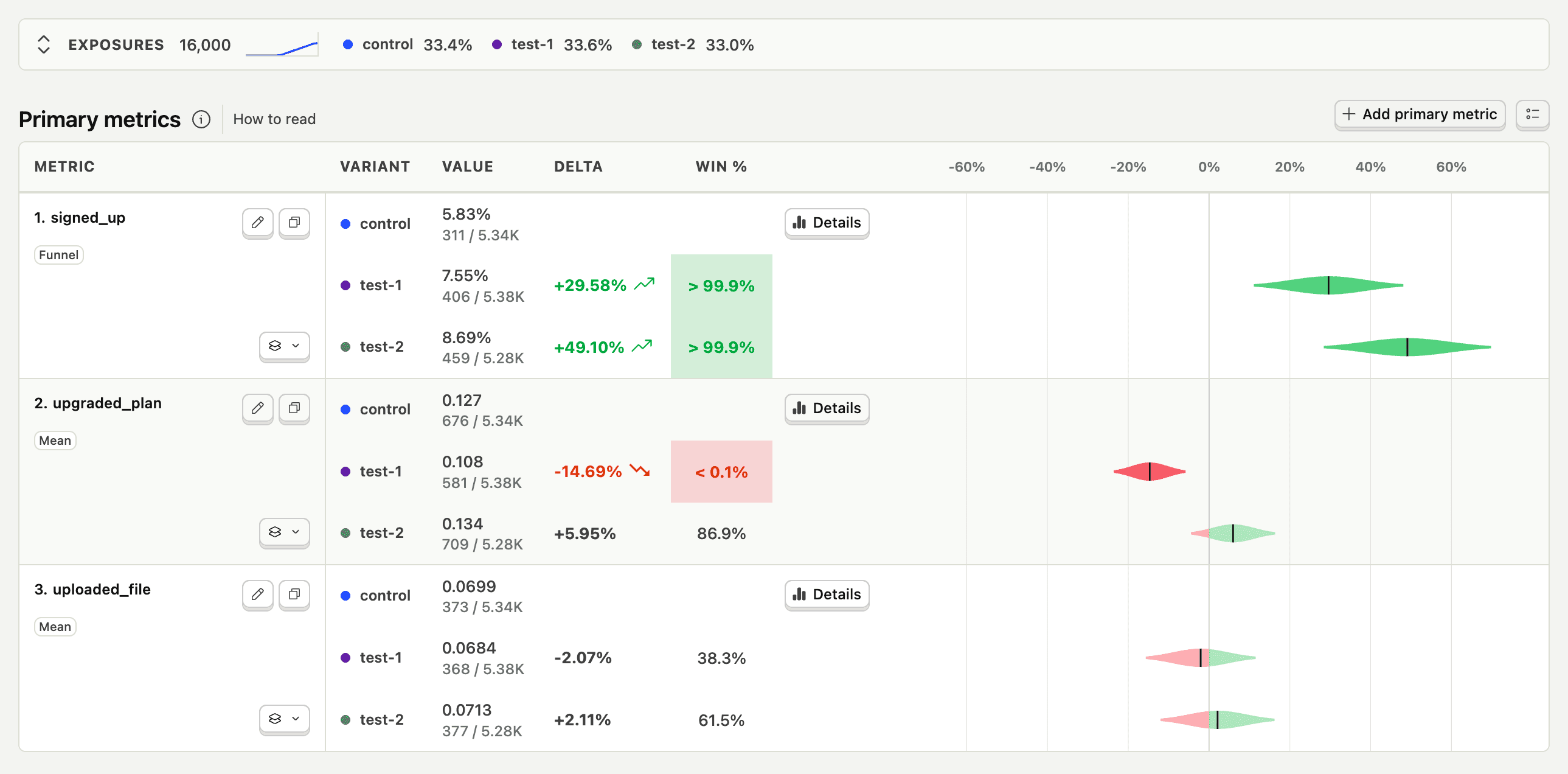
Experiments let you run A/B, A/B/n, holdout, fake door, and redirect tests with statistical significance. Create an experiment (which creates a feature flag), pick primary and secondary metrics, target cohorts or geographies, then launch variants. Bayesian and frequentist engines tell you what won – and you can watch session replays for each variant when you need the why.
Who is it for?
Experiments is used across teams depending on your role.
How do I use it?
There are a few ways to explore Experiments.
Run experiments from your editor
Create A/B tests, check statistical significance, and manage the full experiment lifecycle from Cursor, Claude Code, VS Code, or any MCP-compatible agent.
Top features
Choose the right metric for your goal and track side effects across your product.
Supports conversion funnels, count-based trends, value-based metrics, retention metrics, and ratio metrics
AI prompts
Ask PostHog AI to set up experiments, read the results, and ship the winner. Works in PostHog AI (in-app chat), PostHog Desktop (our AI code editor), and in your product editor (using the MCP). Already signed in? Click a prompt to try it.
Createexperiment-create
Launchexperiment-launch
Resultsexperiment-results-get
Statsexperiment-stats
Timeseriesexperiment-timeseries-results
Ship winnerexperiment-ship-variant
End losersexperiment-end
Duplicateexperiment-duplicate
Archiveexperiment-archive
Findexperiment-list
Shared metricsexperiment-saved-metrics-create
Works with other PostHog tools
Use Experiments with these other PostHog apps to maximize shareholder value.
Works with...
Product Analytics
Run analysis based on the value of a test, or build a cohort of users from a test variant
Session Replay
Watch recordings of users in a variant to discover nuances in why they did or didn't complete the goal
Feature Flags
Make changes to the feature flag the experiment uses - including JSON payload for each variant
Changelog
Recent updates from the Experiments Team.
July 2026(2)
- Jul 24
Metric markers in Experiment replays
Filter Experiment recordings to sessions where selected metric events fired, then jump straight to those moments in the player. Metric…
- Jul 24
Stable results after re-exposure
Experiment maturity and mean or ratio metrics now anchor to each person's first exposure. Re-evaluating a flag no longer shifts that window…
May 2026(3)
- May 28
Winsorization for ratio metrics in Experiments
Experiments now supports winsorization to reduce the effects of outliers for ratio metrics. The numerator and denominator are capped…
- May 21
Configurable default MDE for experiments
Experiments now supports an organization-level default minimum detectable effect (MDE). Set it once in Experiments Settings and every new…
- May 8
Experiment notebook node refresh
The Experiments notebook node now shows exposures with a sparkline, metric results, significance status, and winning variant summary. Your…
April 2026(1)
- Apr 10
Copy experiments across projects
You can now copy experiments across different projects in your organization.
March 2026(3)
- Mar 27
CUPED variance reduction
Experiments now supports CUPED - a statistical method that cuts experiment variance by 20–40%. Same data, sharper results.
- Mar 27
Copy experiments across projects
Copy Experiments and early access features between projects. Start from something that already works.
- Mar 5
Launch experiments without metrics
Experiments can now be created and launched without metrics. Roll out variants and start gathering event data right away. Metrics define…
February 2026(3)
- Feb 12
Better metric error messages
When an Experiment metric fails, you now get clear error messages with actionable options: retry the metric, report the issue to support,…
- Feb 12
Replay summaries for Experiments
Experiments can now summarize session replays related to your experiment results. Get qualitative feedback to understand the story behind…
- Feb 6
Metric breakdowns
Now you can break down your experiment results by event properties. Click on the breakdowns button in the bottom right corner of your…
Questions?
Answers
There are a few ways you can get answers to specific questions about Experiments.
- Check the docs
We have an entire docs-wizard dedicated to docs gardening.
- Search the community forums
With over 100 discussions about Experiments, there's a good chance your answer is already answered!
- Ask PostHog AI
It's an incredibly useful AI chat that understands the product, docs, community questions, our codebase, GitHub issues, and industry knowledge.
- Talk to a human
Dedicated humans are standing by and ready to assist. Best for questions about volume pricing, terms, and sexy legal stuff.
Feature comparison
Install
Built on feature flags – SDKs for web, mobile, and backend, plus no-code platforms.
Web frameworks
Popular



All
































Get started – free
No credit card required. You get the first 1,000,000 requests free every month, then pricing starts at $0.0001/request and reduces with volume.